Friday, October 30, 2015

Multimedia Processing with FFMPEG

FFMPEG is a set of libraries and a command line tool for encoding and decoding audio and video in many different formats. It is a free software project for manipulating/processing multimedia data. Many open source media players are based on FFMPEG libraries.

FFMPEG is developed under Linux but it can be compiled under most operating systems including Mac OS, Microsoft Windows.

For more details about FFMPEG please refer here

For windows operating system, it is preferred to download the pre-built binary from here. It is preferred to download the static build.

For Linux operating system, we can either build from the source by following the instruction given here or can install on Ubuntu using the following command

    sudo apt-get install ffmpeg

YUV

There are lot of color spaces available like RGB, CMYK, HSV, YUV, CIELAB etc., The one that is widely used for video processing is YUV color space. YUV was invented when engineers wanted color television in a black and white infrastructure. They needed a signal transmission method that was compatible with black-and-white TV being able to add color. The luma component already existed as the black-and-white signal, they added the UV signal to this as a solution. More details here.

Inputs to the Image and Video Processing will be generally YUV files. Input video will be usually in YUV 4:2:0 chroma subsampled format. More details here.

Sample YUV sequences can be downloaded from here.

Video Processing with FFMPEG

The below command resizes the input YUV video of resolution 1920x1080 in YUV 4:2:0 format to 1280x720 YUV video

ffmpeg -s:v 1920x1080 -i input.yuv -vf scale=1280:720 -c:v rawvideo -pix_fmt yuv420p output.yuv

The below command decodes the video file in YUV 4:2:2 (YUYV) format

ffmpeg -i input.mp4 -pix_fmt yuyv422 output.yuv

The below command decodes the video file in YUV 4:2:2 (YUYV) format and scales to 1280x720

ffmpeg -i input.mp4 -pix_fmt yuyv422 -vf scale=1280:720 output.yuv

The below command decodes the video file in YUV 4:2:0 format

ffmpeg -i input.mp4 -pix_fmt yuv420p output.yuv

The below command decodes the video file in YUV 4:2:0 format and scales to 1280x720

ffmpeg -i input.mp4 -pix_fmt yuv420p -vf scale=1280:720 output.yuv

If you want to resize to some other resolution change the width and height assigned to the parameter scale.

To compress the YUV file of resolution 1280x720, frame rate 30 fps in H.264 video format at 5 Mbps

ffmpeg -s:v 1280x720 -i input.yuv -vcodec h264 -r 30 -pix_fmt yuv420p -b:v 5000k output.h264

To compress the above video in MPEG4 video format

ffmpeg -s:v 1280x720 -i input.yuv -vcodec mpeg4 -r 30 -pix_fmt yuv420p -b:v 5000k output.m4v

where the parameters present next to the following parameters
-s:v represents input resolution
-i represents input file
-vcodec represents output codec type
-r represents frame rate of the output video
-pix_fmt represents input video YUV chroma subsampling format
-b:v represents bitrate of the output video

Image Processing with FFMPEG

The following command decompresses the JPEG image file and stores it in YUV format

ffmpeg -i image.jpg -pix_fmt yuv420p image.yuv

The following command can be used to resize the JPEG image

ffmpeg -i image.jpg -vf scale=width:height output.jpg
(or)
ffmpeg -i image.jpg -vf scale=1280:720 output.jpg

The following command can be used to convert JPG image to BMP image format

ffmpeg -i image.jpg image.bmp

To make individual still images from the compressed video

ffmpeg -i inputfile %03d.jpg

To make individual still images from the YUV file

ffmpeg -s:v 1280x720 -pix_fmt yuv420p -i inputyuvfile %03d.jpg

To make individual still images from the YUV file with good quality

ffmpeg -s:v 1280x720 -pix_fmt yuv420p -i inputyuvfile -q 1 %03d.jpg

To make individual still images from the YUV file from YUV420SP NV12

ffmpeg -s:v 1280x720 -pix_fmt nv12 -i inputyuvfile -q 1 %03d.jpg


The parameter -q van vary from 1 to 100. Lower the value higher the quality.

Cropping image file
ffmpeg -i inputyuvfile -filter:v "crop=out_w:out_h:left:top" outputfile

Placing 2 images side by side
ffmpeg -i inputfile1 -i inputfile2 -filter_complex hstack outputfile
 

Audio Processing with FFMPEG

FFMPEG can also be used to convert/transcode audio files compressed with MP3 codec to AAC using the following command

ffmpeg -i input.mp3 -c:a libvo_aacenc -b:a 128k output.m4a
(or)
ffmpeg -i input.mp3 -acodec aac -ab 128k -strict experimental output.m4a

where the parameters present next to the following parameters
-c:a or -acodec represents output codec type
-i represents input file
-b:a or -ab represents bitrate of the output audio

To decompress the audio file and store it as PCM samples use the following command

ffmpeg -i input.mp3 output.wav

To compress the uncompressed raw PCM audio samples in wav file to compressed MP3 & AAC format use the below commands

ffmpeg -i input.wav -c:a mp3 -b:a 128k output.mp3
ffmpeg -i input.wav -c:a libvo_aacenc -b:a 128k output.m4a
(or)
ffmpeg -i input.wav -acodec aac -ab 128k -strict experimental output.m4a

Combining Audio and Video files

Suppose if we have video and audio in elementary stream format and we can use the following command to mix them

ffmpeg -i videofile -i audiofile -c:v copy -c:a copy -strict experimental output.mp4

The above command does not perform any processing on the audio and video samples when we use -c:a copy and -c:v copy. It simply copies the contents and packs them in the MP4 container.

Listing all the supported pixel formats

This command lists all the supported pixel formats of FFMPEG

ffmpeg -pix_fmts


Converting RAW (Grayscale) frames to JPEG

Let's say we have a monochrome camera sensor attached to the SoC and the MIPI interface gives us a dump of the camera sensor frames and we want to save the dumped frame as JPEG file, use the following command

ffmpeg -s:v 2592x1944 -pix_fmt gray -i output.raw output.jpg


TV not playing audio for certain files

Often we would have seen certain TV's while playing videos fail to play audio. Use the following command to fix this issue. Almost all of the TV support AAC audio format and the following command converts the audio to AAC format, stores both the video and AAC audio in MP4 container format.

ffmpeg -i inputfile -vcodec copy -acodec aac -ab 128k -strict experimental outfile.mp4

Capture uncompressed videos from webcam with FFMPEG

ffmpeg -f video4linux2 -r 30 -s 640x480 -i /dev/video0 output.avi

If the above command is executed on Laptop /dev/video0 by default selects the Integrated webcam. To capture from external webcam on Laptop change it to /dev/video1.

Conclusion

This article just provides an overview of FFMPEG usage. It can be used at most of the places where we deal with multimedia data. FFMPEG is swiss army knife of multimedia processing. I will provide more insights in the next blogs.

Tuesday, October 21, 2014

UVC Descriptors for Enumeration - USB 2.0

/* Define this flag to add 720p10 support to USB 2.0 */
#define NEW_USB2_MODE

/* Standard High Speed Configuration Descriptor - USB 2.0 */
const uint8_t esUSBHSConfigDscr[] =
{
    /* Configuration descriptor */
    0x09,                           /* Descriptor size */
    CY_U3P_USB_CONFIG_DESCR,        /* Configuration descriptor type */
#ifdef NEW_USB2_MODE
    0xFA,0x00,                      /* Length of this descriptor and all sub descriptors */
#else
    0xDC,0x00,                      /* Length of this descriptor and all sub descriptors */
#endif
    0x02,                           /* Number of interfaces */
    0x01,                           /* Configuration number */
    0x00,                           /* COnfiguration string index */
    0x80,                           /* Config characteristics - bus powered */
    0xFA,                           /* Max power consumption of device (in 2mA unit) : 500mA */

    /* Interface association descriptor */
    0x08,                           /* Descriptor size */
    ES_INTF_ASSN_DSCR_TYPE,       /* Interface association descr type */
    0x00,                           /* I/f number of first video control i/f */
    0x02,                           /* Number of video streaming i/f */
    0x0E,                           /* CC_VIDEO : Video i/f class code */
    0x03,                           /* SC_VIDEO_INTERFACE_COLLECTION : subclass code */
    0x00,                           /* Protocol : not used */
    0x00,                           /* String desc index for interface */

    /* Standard video control interface descriptor */
    0x09,                           /* Descriptor size */
    CY_U3P_USB_INTRFC_DESCR,        /* Interface descriptor type */
    0x00,                           /* Interface number */
    0x00,                           /* Alternate setting number */
    0x01,                           /* Number of end points */
    0x0E,                           /* CC_VIDEO : Interface class */
    0x01,                           /* CC_VIDEOCONTROL : Interface sub class */
    0x00,                           /* Interface protocol code */
    0x00,                           /* Interface descriptor string index */

    /* Class specific VC interface header descriptor */
    0x0D,                           /* Descriptor size */
    0x24,                           /* Class Specific I/f header descriptor type */
    0x01,                           /* Descriptor sub type : VC_HEADER */
    0x00,0x01,                      /* Revision of class spec : 1.0 */
    0x50,0x00,                      /* Total size of class specific descriptors (till output terminal) */
    0x00,0x6C,0xDC,0x02,            /* Clock frequency : 48MHz */
    0x01,                           /* Number of streaming interfaces */
    0x01,                           /* Video streaming I/f 1 belongs to VC i/f */

    /* Input (camera) terminal descriptor */
    0x12,                           /* Descriptor size */
    0x24,                           /* Class specific interface desc type */
    0x02,                           /* Input Terminal Descriptor type */
    0x01,                           /* ID of this terminal */
    0x01,0x02,                      /* Camera terminal type */
    0x00,                           /* No association terminal */
    0x00,                           /* String desc index : not used */
    0x00,0x00,                      /* No optical zoom supported */
    0x00,0x00,                      /* No optical zoom supported */
    0x00,0x00,                      /* No optical zoom supported */
    0x03,                           /* Size of controls field for this terminal : 3 bytes */
    0x2A,0x00,0x02,                 /* No controls supported */

    /* Processing unit descriptor */
    0x0C,                           /* Descriptor size */
    0x24,                           /* Class specific interface desc type */
    0x05,                           /* Processing unit descriptor type */
    0x02,                           /* ID of this terminal */
    0x01,                           /* Source ID : 1 : conencted to input terminal */
    0x00,0x00,                      /* Digital multiplier */
    0x03,                           /* Size of controls field for this terminal : 3 bytes */
    0x5F,0x11,0x00,                 /* No controls supported */
    0x00,                           /* String desc index : not used */

    /* Extension unit descriptor */
    0x1C,                           /* Descriptor size */
    0x24,                           /* Class specific interface desc type */
    0x06,                           /* Extension unit descriptor type */
    0x03,                           /* ID of this terminal */
#if 1
    0x4A,0x00,0xA6,0x29,
    0x02,0xEB,0xAA,0x4D,
    0x82,0xDB,0x35,0x56,
    0x35,0x62,0xDE,0x9D,
#endif
#if 0
0xFF,0xFF,0xFF,0xFF,            /* 16 byte GUID */
0xFF,0xFF,0xFF,0xFF,
#endif
0x01,                           /* Number of controls in this terminal */
0x01,                           /* Number of input pins in this terminal */
0x02,                           /* Source ID : 2 : Connected to Proc Unit */
0x03,                           /* Size of controls field for this terminal : 3 bytes */
    0x00,0x00,0x00,                 /* No controls supported */
    0x00,                           /* String desc index : not used */

    /* Output terminal descriptor */
    0x09,                           /* Descriptor size */
    0x24,                           /* Class specific interface desc type */
    0x03,                           /* Output terminal descriptor type */
    0x04,                           /* ID of this terminal */
    0x01,0x01,                      /* USB Streaming terminal type */
    0x00,                           /* No association terminal */
    0x03,                           /* Source ID : 3 : connected to extn unit */
    0x00,                           /* String desc index : not used */

    /* Video control status interrupt endpoint descriptor */
    0x07,                           /* Descriptor size */
    CY_U3P_USB_ENDPNT_DESCR,        /* Endpoint descriptor type */
    ES_EP_CONTROL_STATUS,        /* Endpoint address and description */
    CY_U3P_USB_EP_INTR,             /* Interrupt end point type */
    0x40,0x00,                      /* Max packet size = 64 bytes */
    0x08,                           /* Servicing interval : 8ms */

    /* Class specific interrupt endpoint descriptor */
    0x05,                           /* Descriptor size */
    0x25,                           /* Class specific endpoint descriptor type */
    CY_U3P_USB_EP_INTR,             /* End point sub type */
    0x40,0x00,                      /* Max packet size = 64 bytes */

    /* Standard video streaming interface descriptor (alternate setting 0) */
    0x09,                           /* Descriptor size */
    CY_U3P_USB_INTRFC_DESCR,        /* Interface descriptor type */
    0x01,                           /* Interface number */
    0x00,                           /* Alternate setting number */
    0x00,                           /* Number of end points : zero bandwidth */
    0x0E,                           /* Interface class : CC_VIDEO */
    0x02,                           /* Interface sub class : CC_VIDEOSTREAMING */
    0x00,                           /* Interface protocol code : undefined */
    0x00,                           /* Interface descriptor string index */

    /* Class-specific video streaming input header descriptor */
    0x0E,                           /* Descriptor size */
    0x24,                           /* Class-specific VS i/f type */
    0x01,                           /* Descriptotor subtype : input header */
    0x01,                           /* 1 format desciptor follows */
#ifdef NEW_USB2_MODE
    0x6B,0x00,                      /* Total size of class specific VS descr */
#else
    0x4D,0x00,                      /* Total size of class specific VS descr */
#endif
    ES_EP_UVC_VIDEO,             /* EP address for ISO video data */
    0x01,                           /* No dynamic format change supported */
    0x04,                           /* Output terminal ID : 4 */
    0x02,                           /* Still image capture method 1 supported */
    0x01,                           /* Hardware trigger supported for still image */
    0x01,                           /* Hardware to initiate still image capture */
    0x01,                           /* Size of controls field : 1 byte */
    0x00,                           /* D2 : Compression quality supported */

    /* Class specific VS format descriptor */
    0x1B,                           /* Descriptor size */
    0x24,                           /* Class-specific VS i/f type */
    0x04,                           /* Descriptotor subtype : VS_FORMAT_MJPEG */
    0x01,                           /* Format desciptor index */
#ifdef NEW_USB2_MODE
    0x02,                           /* Number of frame descriptors */
#else
    0x01,                           /* 1 Frame desciptor follows */
#endif
0x59, 0x55, 0x59, 0x32, /* guid */
0x00, 0x00,
0x10, 0x00,
0x80, 0x00,
0x00, 0xAA, 0x00, 0x38, 0x9B, 0x71,
0x10,                           /* bBitsPerPixel*/
    0x01,                           /* Default frame index is 1 */
    0x00,                           /* bAspectRatioX */
    0x00,                           /* bAspectRatioY */
    0x00,                           /* bmInterlaceFlags */
    0x00,                           /* bCopyProtect */

/* Class specific Uncompressed VS frame descriptor */
    /* VGA 30 FPS */
0x1E,   /* Descriptor size */
0x24,   /* Descriptor type*/
0x05,   /* Subtype: uncompressed frame I/F */
0x01,   /* Frame Descriptor Index */
0x00,   /* Still image capture method 1 supported, fixed frame rate */
0x80,0x02, /* Width in pixel */
0xE0,0x01, /* Height in pixel */
0x00,0x00,0x08,0xCA,            /* Min bit rate bits/s */
0x00,0x60,0x09,0x00,   /* Maximum video or still frame size in bytes(Deprecated)*/
0x15,0x16,0x05,0x00,            /* Default frame interval */
    0x01,                           /* Frame interval type : No of discrete intervals */
    0x15,0x16,0x05,0x00,            /* Frame interval 3 */

#ifdef NEW_USB2_MODE // KK
    // 720p10 USB Device descriptor for USB 2.0
    0x1E,   /* Descriptor size */
    0x24,   /* Descriptor type*/
    0x05,   /* Subtype: uncompressed frame I/F */
    0x02,   /* Frame Descriptor Index */
    0x00,   /* Still image capture method 1 supported, fixed frame rate */
    0x00,0x05, /* Width in pixel */
    0xD0,0x02, /* Height in pixel */
    0x00,0x00,0x08,0xCA,            /* Min bit rate bits/s */
    0x00,0x00,0x08,0xCA,            /* Min bit rate bits/s */
    0x00,0x20,0x1C,0x00,   /* Maximum video or still frame size in bytes(Deprecated)*/
    0x40,0x42,0x0F,0x00,            /* Default frame interval */
    0x01,                           /* Frame interval type : No of discrete intervals */
    0x40,0x42,0x0F,0x00,            /* Frame interval 3 */
#endif

/* Color matching descriptor */
0x06,
0x24,
0x0D,
0x00,
0x00,
0x00,

    /* Standard video streaming interface descriptor (Alternate Setting 1) */
    0x09,                           /* Descriptor size */
    CY_U3P_USB_INTRFC_DESCR,        /* Interface descriptor type */
    0x01,                           /* Interface number */
    0x01,                           /* Alternate setting number */
    0x01,                           /* Number of end points : 1 ISO EP */
    0x0E,                           /* Interface class : CC_VIDEO */
    0x02,                           /* Interface sub class : CC_VIDEOSTREAMING */
    0x00,                           /* Interface protocol code : Undefined */
    0x00,                           /* Interface descriptor string index */

    /* Endpoint descriptor for ISO streaming video data */
    0x07,                           /* Descriptor size */
    CY_U3P_USB_ENDPNT_DESCR,        /* Endpoint descriptor type */
    ES_EP_UVC_VIDEO,             /* Endpoint address and description */
    0x05,                           /* ISO End point : Async */
    ES_EP_ISO_VIDEO_PKT_SIZE_L,  /* 1 transaction per microframe */
    ES_EP_ISO_VIDEO_PKT_SIZE_H,  /* ES_EP_ISO_VIDEO_PKT_SIZE max bytes */
    0x01,                            /* Servicing interval for data transfers */
};

Wednesday, July 30, 2014

Capturing video from camera device under Linux

Uses the video4linux2 (or simply v4l2) input device to capture live input such as from a webcam.

To list the supported, connected capture devices you can use the v4l-ctl tool. This example shows two connected webcams: /dev/video0 and /dev/video1.

$ v4l2-ctl --list-devices

Acer Crystal Eye webcam (usb-0000:00:1a.7-1):
/dev/video0

PATHPARTNER 5MP-OV-1 CAMERA (usb-0000:00:1d.7-1):
/dev/video1

Adjusting camera functions

Brightness, zoom, focus, etc, can be adjusted with v4l2-ctl. Display all controls and their menus:

$ v4l2-ctl -L
                     brightness (int)    : min=-64 max=64 step=1 default=-20 value=20
                       contrast (int)    : min=0 max=95 step=1 default=0 value=0
                     saturation (int)    : min=0 max=128 step=1 default=60 value=60
                            hue (int)    : min=-40 max=40 step=1 default=-5 value=-5
   white_balance_component_auto (bool)   : default=1 value=1
    white_balance_red_component (int)    : min=1 max=500 step=1 default=100 value=100
   white_balance_blue_component (int)    : min=1 max=500 step=1 default=100 value=100
                          gamma (int)    : min=72 max=500 step=1 default=110 value=110
           power_line_frequency (menu)   : min=0 max=2 default=2 value=2
    0: Disabled
    1: 50 Hz
    2: 60 Hz
                      sharpness (int)    : min=0 max=7 step=1 default=2 value=2
         backlight_compensation (int)    : min=0 max=1 step=1 default=0 value=0


Then adjust the value:
v4l2-ctl -c

asvkarthick@asvkarthick:~$ v4l2-ctl --list-formats
ioctl: VIDIOC_ENUM_FMT
Index       : 0
Type        : Video Capture
Pixel Format: 'YUYV'
Name        : YUV 4:2:2 (YUYV)

asvkarthick@asvkarthick:~$ cat /dev/video
video0  video1
asvkarthick@asvkarthick:~$ v4l2-ctl --all
Driver Info (not using libv4l2):
Driver name   : uvcvideo
Card type     : Acer Crystal Eye webcam
Bus info      : usb-0000:00:1a.7-1
Driver version: 3.2.55
Capabilities  : 0x04000001
Video Capture
Streaming
Format Video Capture:
Width/Height  : 640/480
Pixel Format  : 'YUYV'
Field         : None
Bytes per Line: 1280
Size Image    : 614400
Colorspace    : SRGB
Crop Capability Video Capture:
Bounds      : Left 0, Top 0, Width 640, Height 480
Default     : Left 0, Top 0, Width 640, Height 480
Pixel Aspect: 1/1
Video input : 0 (Camera 1: ok)
Streaming Parameters Video Capture:
Capabilities     : timeperframe
Frames per second: 25.000 (25/1)
Read buffers     : 0

  avconv -f video4linux2 -i /dev/video0 video0.avi

Records the captured video frame into the file

Saturday, August 3, 2013

MATLAB Code to convert the Image to Bayer Format(BGGR)

Img = imread('Input.jpg');
ImgBayer = Img;

ImgBayer(:, 2 : 2 : end, 3) = 0;
ImgBayer(2 : 2 : end, :, 3) = 0;
ImgBayer(1 : 2 : end, :, 1) = 0;
ImgBayer(:, 1 : 2 : end, 1) = 0;
ImgBayer(1 : 2 : end, 1 : 2 : end, 2) = 0;
ImgBayer(2 : 2 : end, 2 : 2 : end, 2) = 0;
imshow(ImgBayer)
imwrite(ImgBayer, 'IMG_Bayer.jpg');

Tuesday, April 17, 2012

MATLAB Code to scale down the image height and scale up

% Read the image
Img = imread('plato.jpg');

% Downscale it
ihalf = Img(1 : 2 : end, :, :);
% Display the image
imshow(ihalf);

% Get the height and width of the original image
[height width dim] = size(Img);
ifull = zeros(height, width, dim);
% Upscale the image
ifull(1 : 2 : end, :, :) = ihalf;
ifull(2 : 2 : end, :, :) = ihalf;
ifull = uint8(ifull);
figure;
imshow(ifull);

Hope this works. Happy coding!!!

Tuesday, May 24, 2011

Transrate - Converting audio files from one bitrate to other using BATCH file

Follow the below steps to transrate all the audio files with extension "mp3" in a given directory.

Download the FFMPEG software from the following link:
http://www.videohelp.com/download/ffmpeg-0.5.7z

Extract the software and copy the FFMPEG.exe and create a file with any name without space and extension "bat" and copy the below contents into it.

REM START OF BATCH FILE

mkdir Transcoded

for /f "delims=" %%a IN ('dir /b/n *.mp3') do (
ffmpeg -i "%%a" -ar 44100 -ac 2 -ab 128 -f mp3 ".\Transcoded\%%a"
)

cd Transcoded
for /f "delims=" %%a IN ('dir /b/n *.mp3') do (
move /Y "%%a" "..\%%a"
)

cd ..
del /Q Transcoded
rmdir /Q Transcoded

REM END OF BATCH FILE

Copy these 2 files into the directory which has the MP3 files that you want to transrate.
Double click the batch file for transrate. This batch file converts the audio bitrate to 128kbps. If one wants a different bitrate, change the number near to -ab option to the desired value.

Tuesday, January 11, 2011

SCILAB - An Open Source alternative to MATLAB

Scilab is an open source, cross-platform numerical computational package and a high level, numerically oriented programming language. It can be used for signal processing, statistical analysis, image enhancement, fluid dynamics simulations, numerical optimization, and modeling and simulation of explicit and implicit dynamical systems. MATLAB code, which is similar in syntax, can be converted to Scilab. Scilab is one of several open source alternatives to MATLAB.


Scilab Downloads:

Linux version download

Windows version download


Tuesday, January 4, 2011

INSTALLING MATLAB R2010A IN FEDORA CORE LINUX 13

INSTALLING MATLAB R2010A IN FEDORA CORE LINUX 13
---------------------------------------------------------------------------------
1) Copy MATLAB R2010A from DVD to local drive and extract it.
2) Change the user to root in command terminal and go to ‘/opt/matlab’
3) Set permissions for all the files to directories to 777 using ‘chmod -R 777 matlab/*’
4) chcon -t textrel_shlib_t '/home/asvkarthick/Desktop/MATLAB/matu20Xa/update/bin/glnx86/libmwins.so'
5) chcon -t textrel_shlib_t '/home/asvkarthick/Desktop/MATLAB/matu20Xa/update/bin/glnx86/libmwins.so'
6) /home/asvkarthick/Desktop/MATLAB/matu20Xa/install
7) Install manually without using the Internet
8) Get the installation key and paste it
9) Click Ok
10) Installation process would begin and wait for the completion
11) On successful installation, it prompts for the license file.
12) Use "license_standalone.dat" when asked for license file
13 Open MATLAB and enjoy

Happy Coding!!

-- Karthick Kumaran ASV

Tuesday, June 15, 2010

Blueboard LPC-2148

Blueboard is an open-source initiative at realizing cost effective prototyping and solutions using the versatile LPC 214x series of microcontrollers. Driven at present, by engineering and support from NGX Technologies, the board is provided with necessary interfaces for a quick realization of embedded solutions. NGX Technologies? Blue Board - LPC2148 is a ready-to-run development platform with code snippets to demonstrate applications for every feature supported on the board. The Blue Board offers ubiquitous interfaces making it the best board available for INR 2000. All the technical information related to the project is freely available.


LINARO

A group of semiconductor companies are co-ordinating their approachs to the growing use of Linux-based open-source software in mobile communications devices.

ARM, Freescale Semiconductor, IBM, Samsung, ST-Ericsson and Texas Instruments have set-up a not-for-profit open source software engineering company to be called Linaro.

A focus of the venture will be the support for the development of open-source software applications for "always-on" mobile terminals such as smartphones and netbooks.

All six members of the group develop and supply semiconductor and system-on-chip (SoC) devices for mobile designs.

Leopard Board

The Leopardboard is a full featured, ultra low cost, small form factor, high performance development system which includes TMS320DM355 Processor board and a VGA camera board to provide VGA resolution video capture.

The Leopardboard 365 is enhanced with more HD Video codecs, Face Detection and HD Video output with TMS320DM365.

Tuesday, March 2, 2010

Hawkboard arrived

One more board, Hawkboard, came in line with Beagleboard and costs lesser than BeagleBoard. The newer board with enhanced features costs 5400 INR and is a good starting point for learning embedded linux.


Hawkboard consists of OMAP L-138 - An ARM 9 and Floating Point DSP C674x Application Processor.


Share this with your friends!!!

Happy coding!!!

For more information visit:

http://www.hawkboard.org/

http://hawkboard.wordpress.com/

http://elinux.org/Hawkboard

Tuesday, October 27, 2009

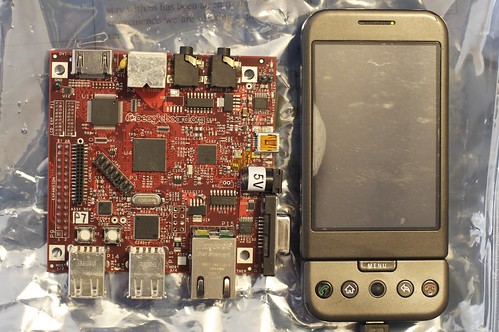
BeagleBoard

It is great to know that IDA systems will be shipping beagleboards in India for just Rs 8999 http://www.idasystems.net/beagle_board
In the past beagleboards were available for 12500 Rs, thanks for Gerald Coley, CircuitCo and IDA to work together in getting the cost down for India.IDA systems is also announced as official distributor for Beagleboards
So any one in India can get local support for beagleboards and shipping should be fast with no lead times like before.Good Luck to IDA and beagle board India users.

Specifications
  • Package on Package POP CPU/Memory chip.
  • TI OMAP3530 600MHz ARM Cortex-A8 core o 'HD capable' TMS320C64x+ core
    Imagination Technologies PowerVR SGX 2D/3D processor
  • 256MB LPDDR RAM memory o 256MB NAND Flash memory
Peripheral connections
  • DVI-D (HDMI connector 1280x1024) , S-Video, USB OTG USB, SD/MMC card slot
  • Stereo in and out jack plug sockets
  • RS232 port
  • JTAG connections
  • Power socket (5V barrel connector type)
Development
  • Boot code store in ROM
  • Boots from NAND memory, SD/MMC, USB, or Serial
  • Alternative Boot source button.
  • Has been demonstrated using Android, Angstrom Linux, Ubuntu, Gentoo and Maemo Linux distributions, the Win CE operating system and a development version of RISC OS 5.